

Zero Trust is becoming the go-to model for businesses that want to stay safe without slowing down. If your team is spread across offices, time zones, or even continents, the old “trust everything inside the firewall” mindset just doesn’t cut it anymore.
According to AI Invest, as of 2025, the Zero Trust security market is estimated at $38.37 billion USD, and projected to grow to $86.57 billion USD by 2030. This growth underscores the increasing adoption of Zero Trust principles to protect against evolving cyber threats.
At SubIT, we’ve seen firsthand how companies struggle to secure their fast-moving environments. That’s why we help businesses shift toward Zero Trust Security in a way that’s both practical and scalable.
Key Takeaways
- Zero Trust Security treats every user and device as untrusted until verified.
- A step-by-step rollout helps organizations protect critical assets without disrupting operations.
- Best practices include using strong identity checks, micro-segmentation, and context-aware access.
- Tools like ZTNA, IdPs, and SIEMs work together to support a secure, scalable Zero Trust environment.
What Is Zero Trust Security?
Zero Trust Security means no one gets automatic access, not even people or devices inside your network. Everyone must prove who they are every time they try to access something, no matter where they are or what device they use.
A 2023 report by Okta revealed that 53% of C-level executives consider the Zero Trust strategy extremely important for their organizations. This model focuses on continuous authentication, strict access controls, and comprehensive monitoring to protect digital assets.
This model flips the old way of doing things. Traditional security assumes that if you’re inside the network, you’re trusted. But that approach breaks down fast when you have remote workers, cloud apps, and constant cyber threats. Zero Trust assumes the opposite, that no user or device is trusted by default.
Instead of a single wall protecting the network, Zero Trust puts security checkpoints throughout your system. These checkpoints look at identity, context, behavior, and permissions before allowing access.
The goal is simple:
- Block unauthorized access
- Limit damage if someone breaks in
- Reduce risk across users, devices, and applications
Core Principles of Zero Trust
Zero Trust is built on a few clear rules:
- Verify explicitly: Always check who the user is, what device they’re using, and whether they’re behaving normally.
- Use least privilege access: Give people only the access they need, nothing more.
- Assume breach: Design systems as if someone is already inside. That way, you’re always ready.
Why Traditional Security Isn’t Enough
Old-school security was built for office buildings, not hybrid cloud environments. It worked when everyone was in the same place using the same devices. Today, that’s rare.
According to a 2023 report by Cisco, 86.5% of organizations have begun implementing some aspect of the Zero Trust security model, but only 2% have mature deployments in place. This shows the need for more adaptable security frameworks like Zero Trust to address modern threats.
Here’s what breaks down with perimeter-based models:
- Once someone gets inside, they can move freely
- VPNs don’t scale well or monitor behavior
- Insider threats go unchecked
- Cloud apps and mobile devices stretch the perimeter until it disappears
- That’s why Zero Trust has become the modern standard.
Step-by-Step Framework for Implementing Zero Trust
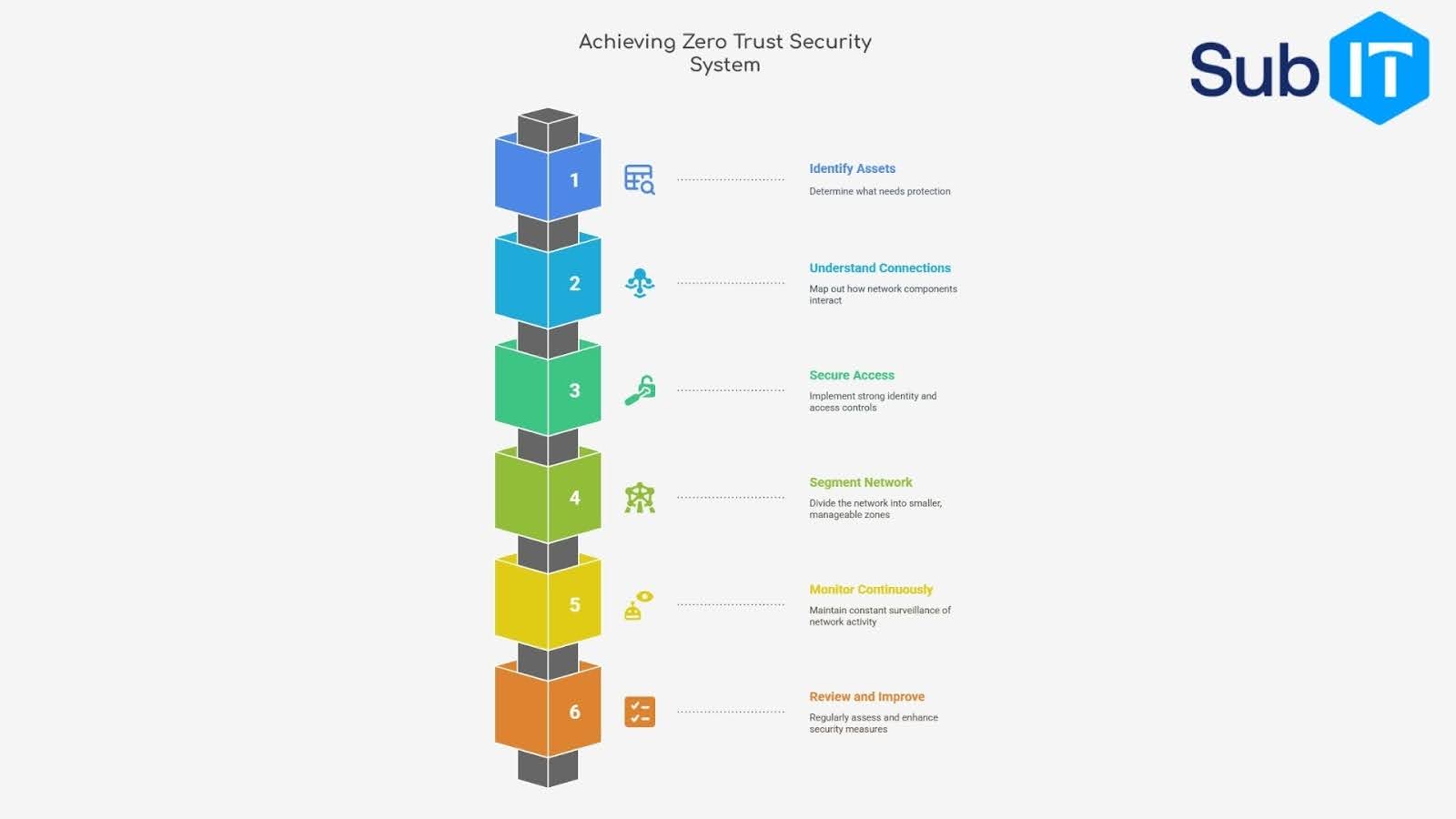 You don’t need to overhaul everything at once. Zero Trust works best when rolled out in steps. Here’s a clear path to follow.
Step 1: Identify What You’re Protecting
Start with your most important assets, customer data, internal tools, sensitive files. Know where they live, who accesses them, and how often. You can’t protect what you don’t see. Mapping your attack surface gives you a clear picture of:
- Critical data and applications
- Entry points for users and devices
- Current security gaps
Step 2: Understand How Everything Connects
Next, trace how users, devices, and services interact. Look at:
- Who logs in where
- How data moves between systems
- Which apps talk to each other
This step helps you catch risky connections, like open ports, unused legacy access, or unnecessary third-party links.
Step 3: Lock Down Identity and Access
Set up strong identity checks. This means:
- Enforcing multi-factor authentication (MFA)
- Using single sign-on (SSO) wherever possible
- Defining who gets access to what, and when
No one should have permanent access to everything. Give users the minimum they need to do their job. That’s the least privileged rule.
Step 4: Break Your Network Into Smaller Zones
This is called micro-segmentation. It limits how far attackers can move if they get in.
- Split your network by:
- Application type
- User role
- Data sensitivity
So if something gets compromised, it stays contained. No lateral movement, no widespread damage.
Step 5: Monitor Everything, All the Time
Set up systems to watch traffic, behavior, and access in real time. Use tools that can:
- Detect unusual logins
- Flag suspicious downloads
- Alert you when rules are broken
Think of this as your early warning system. It helps you respond fast before a small issue becomes a full-blown breach.
Step 6: Review, Improve, Repeat
Zero Trust isn’t a one-and-done job. As your business grows, new risks show up. Make time to:
- Test your rules regularly
- Adjust policies based on what’s working
- Train teams on how to use systems safely
- The best Zero Trust strategies evolve. The more you learn, the stronger your defenses get.
4 Best Practices for Zero Trust Deployment
These best practices help you avoid common mistakes and get the most out of your setup.
1. Think in Terms of Identity, Not Perimeter
Instead of focusing on where someone connects from, focus on who they are and what they’re trying to do. A trusted user on an untrusted device is still a risk. That’s why identity is the new perimeter.
Build your policies around:
- User identity
- Device health
- Real-time context (location, time, behavior)
2. Keep Access Tight and Temporary
Access should never be open-ended. Use rules like:
- Expiring permissions
- Just-in-time (JIT) access
- Role-based restrictions with overrides only when needed
If someone needs elevated access, make it temporary. That reduces your attack surface without slowing down the team.
3. Use Context to Make Smarter Security Decisions
Set dynamic access policies that adapt based on:
- Where a user is logging in from
- Whether they’ve logged in before
- What device they’re using
Context-aware security blocks risky behavior without locking out legitimate users. It’s smarter and more flexible than blanket rules.
4. Get Buy-In from Everyone
Your tech won’t matter if people ignore it. Train your teams. Show them why Zero Trust matters. Make tools easy to use so no one tries to work around them. When security feels like a roadblock, people look for shortcuts. When it fits into the workflow, they stay secure without even thinking about it.
Top Tools and Technologies Supporting Zero Trust
 You can’t build a Zero Trust model with policy alone, you need tools that enforce it. These technologies help you verify users, control access, and monitor everything in real time.
Identity Providers (IdPs)
Everything starts with identity. IdPs handle who gets in and how. Look for providers that support:
- Single Sign-On (SSO)
- Multi-Factor Authentication (MFA)
- Conditional access rules
Popular choices:
- Okta
- Microsoft Entra ID (formerly Azure AD)
- Google Workspace Identity
- Ping Identity
These tools connect to all your apps and systems, letting you control access from one place.
Zero Trust Network Access (ZTNA)
ZTNA replaces old-school VPNs. Instead of giving full access to the network, it only grants access to the specific app or resource the user needs. ZTNA benefits include:
- Granular control
- Cloud-friendly
- Reduces lateral movement
- Vendors to consider:
- Zscaler
- Palo Alto Prisma Access
- Cloudflare Zero Trust
- Tailscale
- ZTNA tools are key to enforcing least privilege at scale.
Security Information and Event Management (SIEM)
Once Zero Trust is running, you need a way to watch what’s happening. That’s where SIEM tools come in. They collect logs, detect threats, and alert your team. Features to look for:
- Real-time anomaly detection
- Behavior analytics
- Integration with IdP and endpoint tools
Common tools:
- Splunk
- Microsoft Sentinel
- IBM QRadar
- Elastic Security
Micro-Segmentation and Software-Defined Perimeter (SDP)
To stop attacks from spreading, you need to split your environment into zones. These tools help enforce that with precision.
Use cases:
- Limit access by role or location
- Secure legacy apps that can’t run modern controls
- Isolate critical systems
Tools:
- Illumio
- Akamai Guardicore
- Cisco Tetration
- Micro-segmentation makes Zero Trust harder to bypass, even if something breaks.
Secure Smarter. Scale Confidently
Zero Trust doesn’t have to be complicated, it just has to be done right. With SubIT, you get more than tools and talk. You get a reliable team that knows how to secure growing businesses across locations, time zones, and tech stacks.
If you’re ready to lock down your systems without locking out your people, we’re here to help.