Cloud Backup Explained: What It Is, How It Works, and Why Your Data Needs It
Losing important data can bring your business to a halt. According to Brainly, 84% of organizations are already using cloud backup technology.
At SubIT, we know how much you depend on technology, which is why our cloud backup solutions are designed to work just like a full in-house IT department. Our team is here to keep your information secure, accessible, and protected, no matter where your employees work or what the day brings.
Key Takeaways
Cloud backup automatically protects your data by storing encrypted copies on secure remote servers.
It offers better security, access, and scalability compared to traditional physical backup methods.
There are three main types, public, private, and hybrid, each suited to different security and cost needs.
Choosing the right cloud backup service involves checking for strong encryption, automation, compliance, and ease of recovery.
What Is Cloud Backup?
Cloud backup is a service that automatically copies your files and data to secure remote servers online.
If your device fails, gets lost, or is attacked by malware, you can restore your information from the cloud. Unlike traditional backups on hard drives or USB sticks, cloud backup works over the internet and protects your data from local disasters, theft, or damage.
It encrypts your files, keeps them up to date, and lets you recover them anywhere with an internet connection. This solution is used by businesses and individuals who want simple, reliable data protection without extra hardware or manual effort.
How Does Cloud Backup Work?
Cloud backup works by automatically sending copies of your files from your device to a remote data center over the internet. Even though the process is simple, only 10% of IT users actually back up their computer data daily, as reported by Expert Insights.
Here’s how the process happens:
You pick which files or folders you want to protect.
The backup software encrypts your data for security.
Your files are uploaded to secure servers in the cloud.
The service keeps your backups updated by saving new or changed files, often in real time or on a set schedule.
If you lose data, you can log in and quickly restore your files from the cloud to any device.
Cloud Backup vs. Traditional Backup: Key Differences
Traditional backup uses physical devices like external hard drives or USB sticks to store copies of your data. Cloud backup stores your files online, on remote servers you can reach through the internet.
Here’s how they compare:
Location: Traditional backups are kept nearby. Cloud backups are offsite and protected from local disasters.
Access: Cloud backups let you restore files anywhere with internet. Traditional backups require you to have the device with you.
Security: Cloud services use strong encryption and manage updates automatically. Traditional backups rely on your setup and can be lost or damaged.
Automation: Cloud backups run on a schedule or in real time, with little input needed. Traditional backups are often manual.
Scalability: Cloud storage expands as you need it. Physical devices have fixed space.
In short, cloud backup is safer from physical risks, easier to access, and simpler to maintain than traditional backup methods.
Step-by-Step Cloud Backup Process
Cloud backup follows a clear process to keep your data safe:
Select Data: You choose which files, folders, or entire systems to back up.
Encrypt Files: The backup software encrypts your data to keep it private during transfer and storage.
Upload to Cloud: Encrypted files are sent over the internet to remote, secure servers.
Store and Monitor: The cloud provider stores your data and often monitors it for errors or security threats.
Update Backups: The service automatically adds new files or changes to your backups, either on a schedule or in real time.
Restore Data: If you need to recover something, you log in and download the files you want.
This process runs quietly in the background, so you’re always protected with the latest version of your data.
3 Types of Cloud Backup
Cloud backup comes in three main types:
Public Cloud Backup: Your data is stored on servers shared with other users, managed by large providers like Google or Amazon. It’s flexible, cost-effective, and easy to scale.
Private Cloud Backup: Data is saved on dedicated servers, either at your location or in a specialized data center. This gives more control and is often used by businesses with strict security or compliance needs.
Hybrid Cloud Backup: Combines both public and private cloud. Critical or sensitive files can stay on private servers, while other data is sent to the public cloud. This balances security, cost, and flexibility.
Benefits of Cloud Backup
Cloud backup offers several key advantages:
Security: Your files are encrypted before leaving your device and while stored in the cloud, protecting them from hackers and unauthorized access.
Automation: Backups run automatically, so you don’t have to remember to copy files or manage hardware.
Disaster Recovery: If your computer is lost, stolen, or damaged, you can quickly restore your data from anywhere with internet access.
Scalability: You can increase or decrease your backup storage as your needs change, with no need to buy new hardware.
Cost Savings: You pay only for the space you use, avoiding upfront costs for backup equipment.
Compliance: Many cloud backup services help meet industry rules for data privacy and security.
Common Challenges and Risks
Cloud backup is reliable, but it comes with some challenges:
Security Risks: If your account credentials are weak or stolen, someone could access your data. Strong passwords and two-factor authentication help reduce this risk.
Compliance Issues: Some industries require data to be stored in specific regions or under strict privacy laws. Not all cloud providers meet every compliance need.
Downtime: If the backup provider’s servers go down or your internet connection fails, you may not be able to access your backups until service is restored.
Vendor Lock-In: Switching providers can be difficult if your data is stored in a format only one service supports.
How to Choose a Cloud Backup Solution
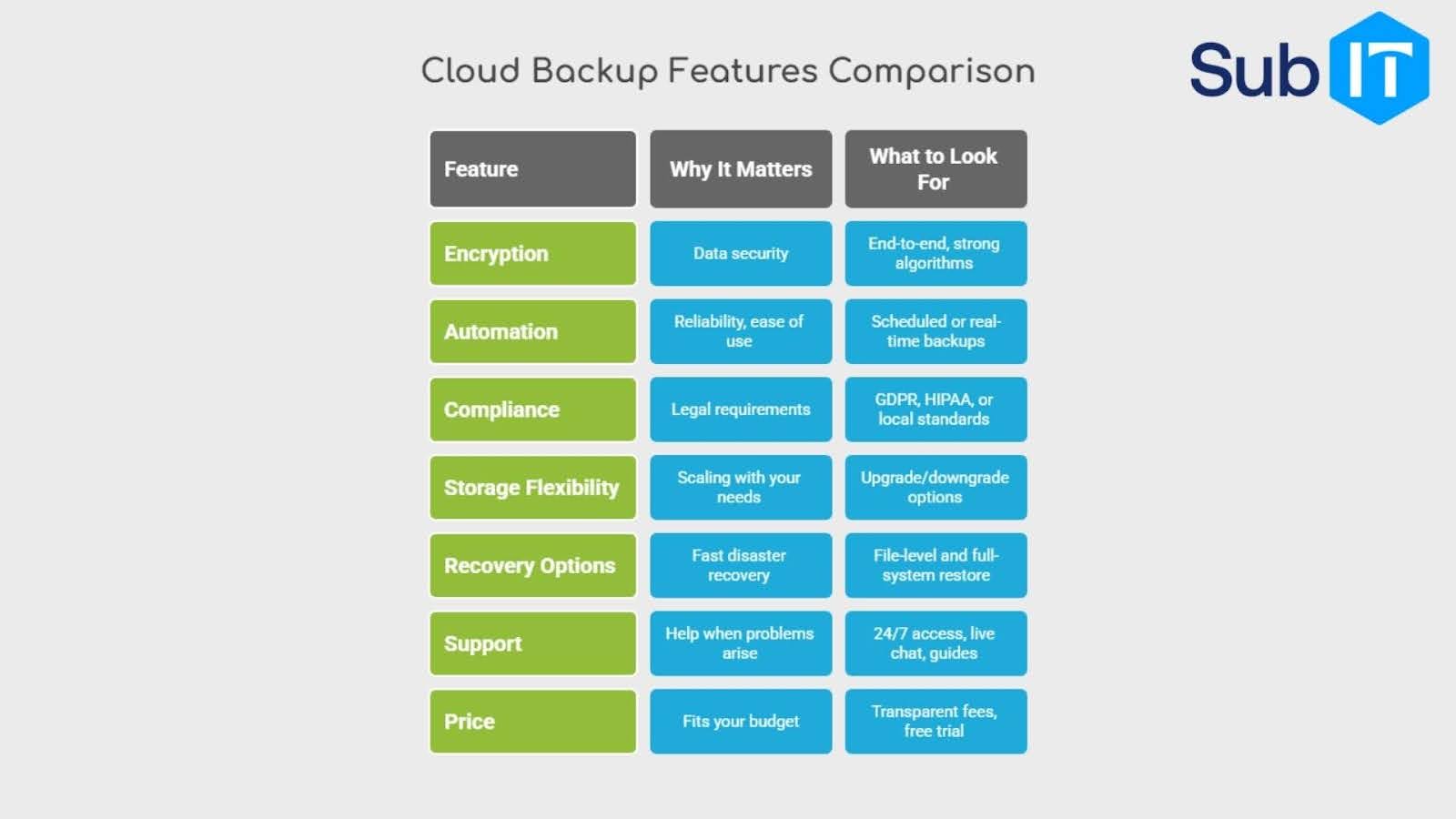
Start by looking for a provider that meets your needs for security, storage space, and ease of use. Make sure the service offers strong encryption and two-factor authentication to keep your data safe. Check that backups are automatic, so you don’t have to remember to run them.
If your business has legal or industry requirements, confirm the provider supports compliance standards like GDPR or HIPAA. Consider where your data will be stored, some companies need data to stay within certain countries or regions.
Make sure to look for features like easy data recovery, flexible storage options, and good customer support. It helps to read reviews or case studies from similar users or industries. Finally, compare prices and see if the provider offers a free trial before you commit.
Protect Your Data With a Team That Has Your Back
Cloud backups are about making sure your business never misses a beat. At SubIT, we blend real-world IT experience with people-focused service, so you always have professional support and reliable protection, no matter what happens.
If you’re ready for data security that actually works for your team, connect with us today. Visit our contact page to get answers, advice, or start a cloud backup plan that fits your business. We’re here to help you move forward with confidence.
Please fill out the short form below. Then click the schedule your consultation button. You will be directed to a calendar to select a day and time that works for you!
Testimonials
Client Success Stories
Don’t take our word for it. Here’s what happened when these businesses made the switch to SubIT.
Sub IT and their team are the best in the game!! Best decision I could have made for my company. They’re extremely responsive and knowledgeable. They really facilitate all of our IT needs ensuring maximum efficiency and satisfaction for our customers. Thanks Sub IT !
Daniel Merino
My company has been using subIT for a while now and I can honestly say they’re one of the best IT management and support companies in Miami. The team is super efficient, always quick to respond and very knowledgable. Whether it’s managing our network, handling cloud backups, setting up new equipment, or helping with cybersecurity, they’ve been all over it.
Most importantly, everyone I’ve interacted with is friendly, professional, and easy to work with. You can tell they take customer service seriously. Highly recommend them if you’re looking for solid IT support.
Kristine S. Quintanal
I recently worked with SubIT for our IT needs, and I could not be happier WTH the results. Their team was incredibly knowledgeable and responsive, addressing all our technical challenges promptly. They took the time to understand our business requirements and provided tailored solutions that greatly improved our efficiency. They really helped us improve our cybersecurity to make sure we were following the right protocols. Their customer support and IT support is outstanding; any questions we had were answered quickly and thoroughly. Their IT support ticketing system is so user friendly. I highly recommend SubIT for anyone looking for a reliable and professional IT services!
Briana Martinez
I can’t express enough how pleased I am with the outstanding services SubIT provides us. Manny and his team treated me like I was their most Important client. The kindness and attention to detail was unmatched. Some of the help I received honestly felt like having a dedicated chief strategist on board.
I’m not a typical reviewer but when companies do great work, they deserve to be recognized. I have had other IT experiences and this doesn’t even come close. I can actually talk to someone. The staff is top notch. Not looking back.
Elis Rojas
Managing Partner of Law Firm
SubIT has assisted my small business for over a year now. They are efficient, knowledgeable, and are informed in complex areas of cyber security. Our IT needs are completely met and our staff is able to be productive because of SubIT’s service. We could not recommend them more!
Jose
Managing Partner of Law Firm
“SubIT stands out among the other firms we’ve used in the past.”
The single greatest benefit to having SubIT handle our IT is that we’ve been able to outsource an entire department to a group of professionals with the technical expertise necessary to streamline a lot of the processes that would normally fall on us. SubIT stands out among the other firms we’ve used in the past by being agile and adaptable. When we’ve presented them with unique issues they’ve been able to adapt and deliver solutions to specifically address our needs faster than I’ve thought possible. Additionally, there’s no drop off of talent or expertise depending on what rep you’re working with, there is quality up and down the roster.
If someone is on the fence, I would advise them not to think twice. Leave the IT work to SubIT; let SubIT handle your IT and technical issues so you can get back to doing what you love most, running and growing your business.
Raymond
Partner of CPA Firm
“They are a part of our team.”
SubIT offers so much however their three greatest strengths are: consistent, service, availability, and our relationship with them. They are a part of our team.
Make no mistake, SubIT must be your first choice for IT Services.
Estrella
CFO of Construction Company
“We no longer have to worry about long delays.”
Peace of mind is the biggest benefit we have experienced with working with SubIT. We no longer have to worry about long delays like we did before. Their response time is excellent, and our needs are taken care of. Try SubIT – you will not be disappointed!
Juan
COO of Primary Care Centers
“Can quickly provide solutions to our needs.”
With SubIT we have continuous access to knowledgeable and experienced IT professionals ready to assist us in resolving both complex and routine matters.
SubIT is above the industry standard by offering immediate responses to our staff and can quickly provide solutions to our needs. SubIT works diligently to resolve your technical issues and provides peace of mind.
Eduard
Partner, CPA Firm
The biggest benefits of working with SubIT are teamwork and reliability. All the technicians are knowledgeable and friendly. SubIT is quick to respond to our company’s needs especially when it comes to network solutions and in business time is money. We can’t afford for our systems to be down and SubIT keeps us up and running